3 new
Documents
Contracts, project files, proposals, and shared records.
View areaProjects • Documents • Payments • Support • Scheduling
CrossMerg creates secure, branded client portals where customers can follow work, access documents, review estimates and invoices, make payments, request support, and schedule appointments without relying on scattered email threads.
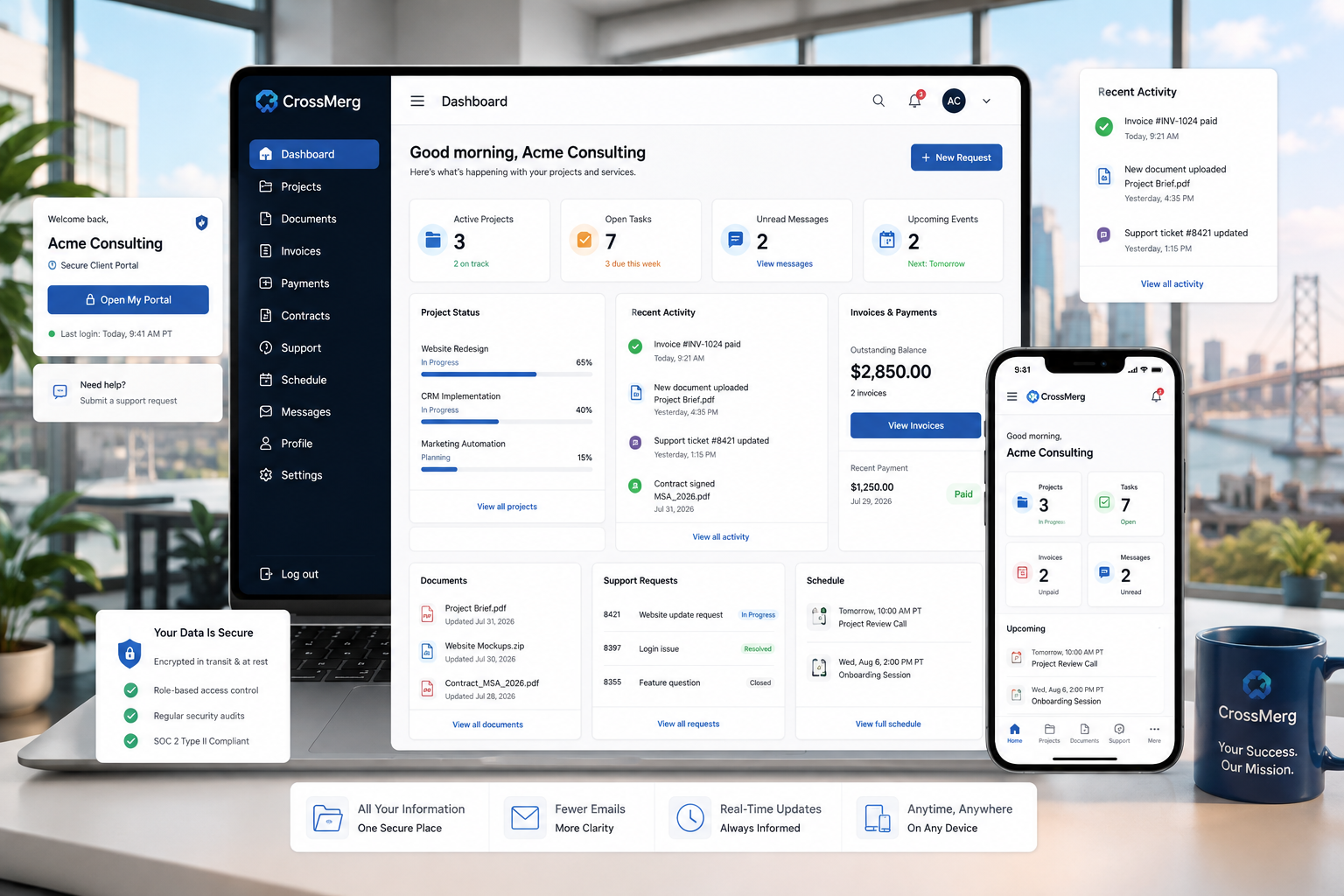
A living client workspace
Instead of another static login area, the portal becomes an active workspace where clients can see what changed, find what they need, and complete common actions without starting another email thread.
Contracts, project files, proposals, and shared records.
View areaBalances, payment history, statements, and available payment actions.
View areaStructured requests with status, history, files, and responses.
View areaUpcoming calls, consultations, and scheduling access.
View areaProgress, milestones, tasks, discussions, and recent activity.
View areaClient communication connected to the correct account and work.
View areaOne connected client journey
A well-designed portal reduces friction across the entire relationship. Clients can move naturally from understanding what is happening to reviewing records, approving work, paying an invoice, or scheduling the next conversation.
Enter a branded account with the correct permissions.
Review projects, services, milestones, and recent changes.
Open documents, proposals, estimates, and contracts.
Accept an estimate, sign a contract, or respond to a request.
Review invoices and use available payment actions.
Schedule the next appointment without searching for another link.
One repeatable experience
The portal becomes the dependable account layer behind projects, records, payments, support, communication, and scheduling.
Secure access without unnecessary complexity
A well-planned portal starts with the relationship and permissions—not with turning on every available feature. CrossMerg helps shape an experience that is useful, understandable, and appropriately controlled.
We identify which records, services, actions, and communication paths should be available to clients.
Each client contact can be aligned with the projects, records, and permissions relevant to their role.
Portal areas are enabled intentionally so users see what they need without exposing unrelated information.
The portal presentation is aligned with the business so the experience feels credible and connected.
Clients receive clear access instructions and a practical explanation of what the portal is for.
CrossMerg continues helping with configuration, questions, workflow changes, and portal improvements.
Different contacts can receive access appropriate to their responsibilities.
Avoid shared generic logins and preserve clearer accountability.
Shared documents remain connected to the right client and portal area.
Meaningful changes and communication retain useful context over time.
Protected access helps keep client account activity private in transit.
CrossMerg helps configure the experience intentionally instead of enabling everything by default.
Before and after a client portal
The improvement is not simply adding a login screen. It is reducing friction by keeping status, records, communication, and actions connected.
Before
After CrossMerg
Business outcomes
The portal gives clients more independence without making the relationship feel impersonal. Your team remains available—but no longer has to manually rebuild every status update, document trail, or account history.
Fewer
Clients can review progress, activity, files, and next steps before sending another follow-up email.
Faster
Documents, agreements, estimates, invoices, and project files stay connected to the client account.
Better
Requests and discussions retain the context, history, and attachments needed to move work forward.
Stronger
A secure branded portal gives clients a more dependable and professional way to work with the business.
One connected result
Client portal questions
The exact portal experience depends on your services, client relationships, and permissions. These answers explain the CrossMerg approach.
Access can include projects, tasks, milestones, files, proposals, estimates, invoices, payments, contracts, support tickets, appointments, announcements, and account information. The exact experience is configured around the services and permissions appropriate to the business.
Yes. Portal access can be assigned by contact so different people within the same client organization can receive access appropriate to their responsibilities.
No. Email remains useful for notifications and direct communication. The portal provides the organized source of truth behind those messages so clients can return to records, status, files, and history.
Supported payment actions can be made available based on the configured payment gateways, invoice settings, and services used by the business.
CrossMerg can align the portal presentation with the business brand so clients experience a consistent relationship rather than an unrelated generic system.
Yes. CrossMerg can provide ongoing configuration, support, maintenance, user guidance, and practical improvements as the client workflow evolves.
A better client experience, fully managed
We’ll configure, brand, maintain, and support your portal so clients always have one reliable place for projects, records, approvals, payments, support, and scheduling.
Why businesses trust CrossMerg
We help teams improve the client experience without adding unnecessary complexity, forcing a large migration, or losing sight of how the business actually works.
Practical value
Founder perspective
How we work
Client-first language
We translate internal workflow into simple client-facing steps that reduce friction.
Lightweight rollout
Start with one feature before rolling out deeper portal options.
Works with your reality
We respect your team size, tools, and capacity — no forced big-bang migrations.