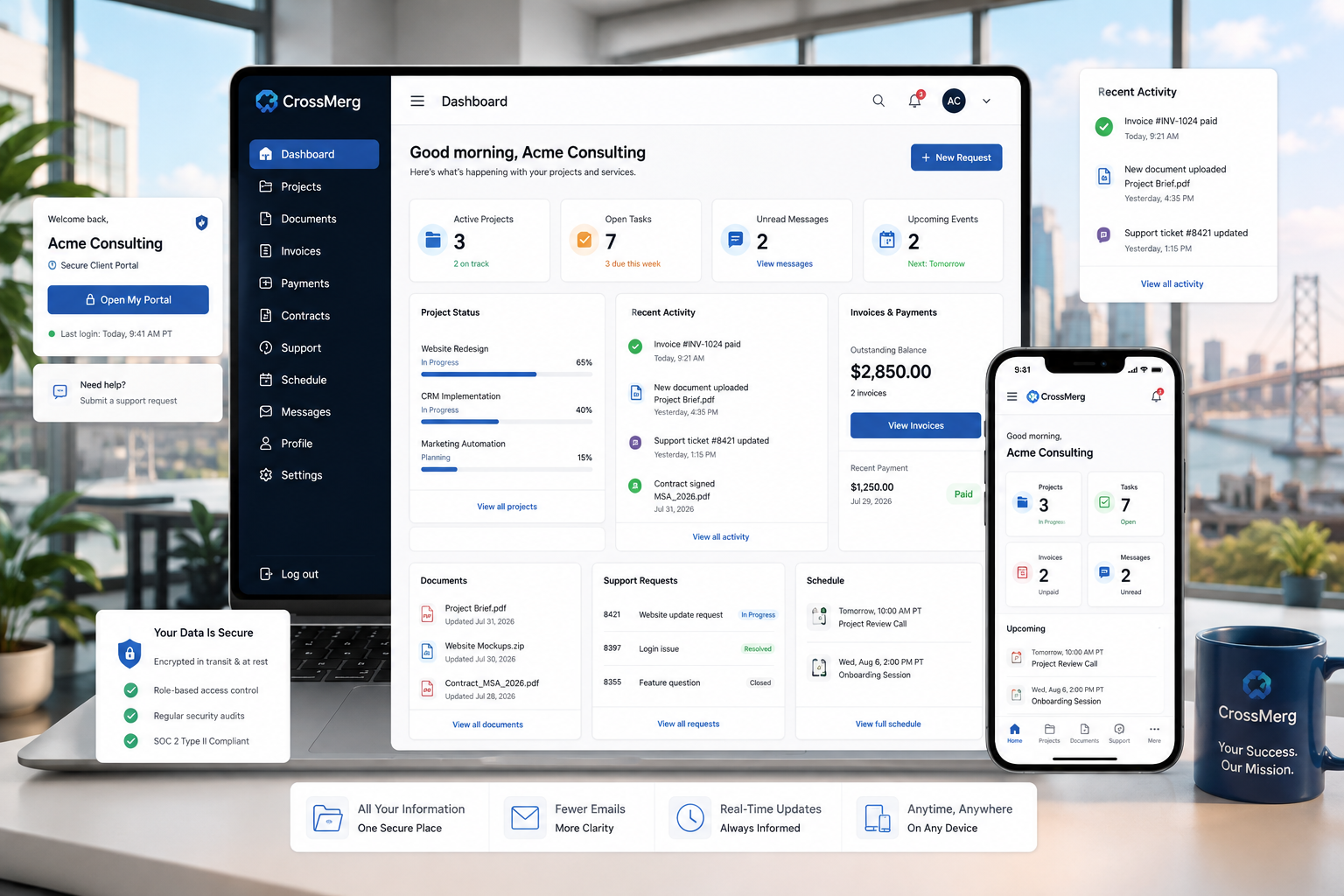
Updates are scattered across email
Clients ask for status because project progress, files, decisions, and next steps live across separate messages and attachments.
Projects • Documents • Payments • Support • Scheduling
CrossMerg creates secure, branded client portals where customers can follow work, access documents, review estimates and invoices, make payments, request support, and schedule appointments without relying on scattered email threads.
Where client service starts to fragment
Most businesses do not need another disconnected portal. They need one dependable client account that reduces administrative friction while keeping the relationship clear, personal, and easy to manage.
Clients ask for status because project progress, files, decisions, and next steps live across separate messages and attachments.
Proposals, estimates, contracts, invoices, project files, and completed work become difficult to locate after the original message is buried.
A simple approval can turn into a chain of messages when the client cannot clearly see what needs attention or what happens next.
Invoices, balances, statements, and supported payment actions are harder to manage when the financial record is separated from the broader client relationship.
Requests arrive through different channels without the project, files, prior replies, or account context needed to understand the issue quickly.
Shared links and generic logins make it difficult to give each contact the right access to projects, financials, documents, and communication.
A living client workspace
The portal is more useful when it does more than store records. It should help a client understand the current relationship, complete the next action, and return later without rebuilding context from email.
Needs your attention
Account areas
Contracts, project files, proposals, and shared records.
View areaBalances, payment history, statements, and available payment actions.
View areaStructured requests with status, history, files, and responses.
View areaUpcoming calls, consultations, and scheduling access.
View areaProgress, milestones, tasks, discussions, and recent activity.
View areaClient communication connected to the correct account and work.
View areaOne connected client journey
The best client portals do more than expose features. They create a repeatable path: understand what changed, find the supporting information, make the decision, complete the action, and know what happens next.
Designed around the client question
A branded login brings each contact into the areas and records appropriate to their role.
Projects, milestones, service status, messages, and recent activity provide current context without another status request.
Files, proposals, estimates, contracts, invoices, and related records stay connected to the client account.
Approvals, signatures, responses, and other requested actions can be surfaced with the context needed to make the decision.
Supported payment, invoice, support, and account actions remain available from the same client workspace.
Scheduling and follow-up access give clients a clear next step while the history of the relationship stays in one place.
One repeatable experience
Access, permissions, and ownership
A well-planned portal starts with the relationship and permissions, not with turning on every available feature. CrossMerg helps define who should see what, who maintains the setup, and how access stays current as the relationship changes.
Your team + CrossMerg
We decide which records, services, actions, and communication paths belong in the client-facing experience.
A clear boundary between what clients need and what stays internal.
Your team
Identify who should have access, what each person is responsible for, and which account areas apply to their role.
Individual access instead of shared generic credentials.
CrossMerg
CrossMerg configures portal areas and contact permissions so users can reach the information they need without exposing unrelated records.
Permission-aware access with practical least-access defaults.
CrossMerg + Your team
Branding, labels, navigation, and available actions are aligned with the way your business actually serves clients.
A portal that feels connected to your business rather than bolted on.
CrossMerg
Clients receive a clear access path, practical guidance, and an understandable explanation of what the portal is for.
A calmer first login and fewer avoidable support questions.
CrossMerg + Your team
Permissions, contacts, portal areas, and workflows are reviewed as roles, projects, and client relationships change.
Access stays current instead of quietly becoming outdated.
Who owns what
The portal works best when business decisions, technical configuration, and everyday account use each have an obvious owner.
Your team
CrossMerg
Client contacts
Different contacts can receive access appropriate to their responsibilities.
Avoid shared generic logins and preserve clearer accountability.
Shared documents remain connected to the right client and portal area.
Meaningful changes and communication retain useful context over time.
Protected access helps keep client account activity private in transit.
CrossMerg helps configure the experience intentionally instead of enabling everything by default.
From scattered to connected
A portal does not replace good communication. It gives routine information and supported actions a dependable home, so conversations can focus on the work that actually needs a person.
Without a portal
Clients email or call because the latest update is buried in a thread or spread across different systems.With CrossMerg
Current status, recent activity, and next actions are available from the client account.Without a portal
Files, estimates, invoices, approvals, and project records are found through links, attachments, and staff memory.With CrossMerg
Client-facing records remain organized around the account and the work they belong to.Without a portal
Approvals, payments, support requests, and follow-up actions require another message explaining where to go.With CrossMerg
The portal gives clients a dependable place to review context and take the next supported action.Practical business outcomes
The goal is not another place for your team to maintain. It is a clearer client-facing layer that reduces routine friction, keeps records easier to reach, and supports a more professional relationship.
Fewer
Clients can review progress, activity, files, and next steps before sending another follow-up email.
Faster
Documents, agreements, estimates, invoices, and project files stay connected to the client account.
Better
Requests and discussions retain the context, history, and attachments needed to move work forward.
Stronger
A secure branded portal gives clients a more dependable and professional way to work with the business.
Small-business fit
You do not need a large enterprise operation to benefit. The strongest fit is usually a service business where clients return for information, decisions, records, payments, support, or ongoing work.
Fully managed by CrossMerg
CrossMerg remains available to support configuration, branding, permissions, workflows, questions, and practical improvements after launch.
Client portal decision guide
The exact portal experience depends on your services, client relationships, permissions, and the actions clients need to complete. These questions help clarify fit before configuration begins.
Common questions
Access can include projects, tasks, milestones, files, proposals, estimates, invoices, payments, contracts, support tickets, appointments, announcements, and account information. The exact experience is configured around the services and permissions appropriate to the business.
Yes. Portal access can be assigned by contact so different people within the same client organization can receive access appropriate to their responsibilities.
No. Email remains useful for notifications and direct communication. The portal provides the organized source of truth behind those messages so clients can return to records, status, files, and history.
Supported payment actions can be made available based on the configured payment gateways, invoice settings, and services used by the business.
CrossMerg can align the portal presentation with the business brand so clients experience a consistent relationship rather than an unrelated generic system.
Yes. CrossMerg can provide ongoing configuration, support, maintenance, user guidance, and practical improvements as the client workflow evolves.
A practical first conversation
We can look at how clients currently receive updates, find records, approve work, make payments, request support, and interact with your team. From there, we can decide what belongs in a portal and what should stay exactly as it is.
What we can review together
Review where client information and routine actions are scattered today.
Identify which contacts need access and what each person should be able to see or do.
Decide whether a client portal is the right next step—and what a sensible first version should include.
When you are ready, the next step is simply to talk through the client experience you have today.
Bring us the client experience you have today. We will help identify where a portal can reduce friction, what clients should be able to access, and whether the right first step is a focused portal build or a smaller workflow improvement.
Why businesses trust CrossMerg
We help teams improve the client experience without adding unnecessary complexity, forcing a large migration, or losing sight of how the business actually works.
Practical value
Founder perspective
How we work
Client-first language
We translate internal workflow into simple client-facing steps that reduce friction.
Lightweight rollout
Start with one feature before rolling out deeper portal options.
Works with your reality
We respect your team size, tools, and capacity — no forced big-bang migrations.