Landscaping & Tree Services

Leads • Estimates • Scheduling • Jobs • Follow-Up • Reporting

Keep the customer journey connected from the first inquiry to the next job.

CrossMerg helps landscaping and tree service companies organize leads, estimates, scheduling, customer communication, job follow-up, and business visibility around one connected operating system—with CRM at the center.

CRM-centered Built around your process Works with useful tools you already have
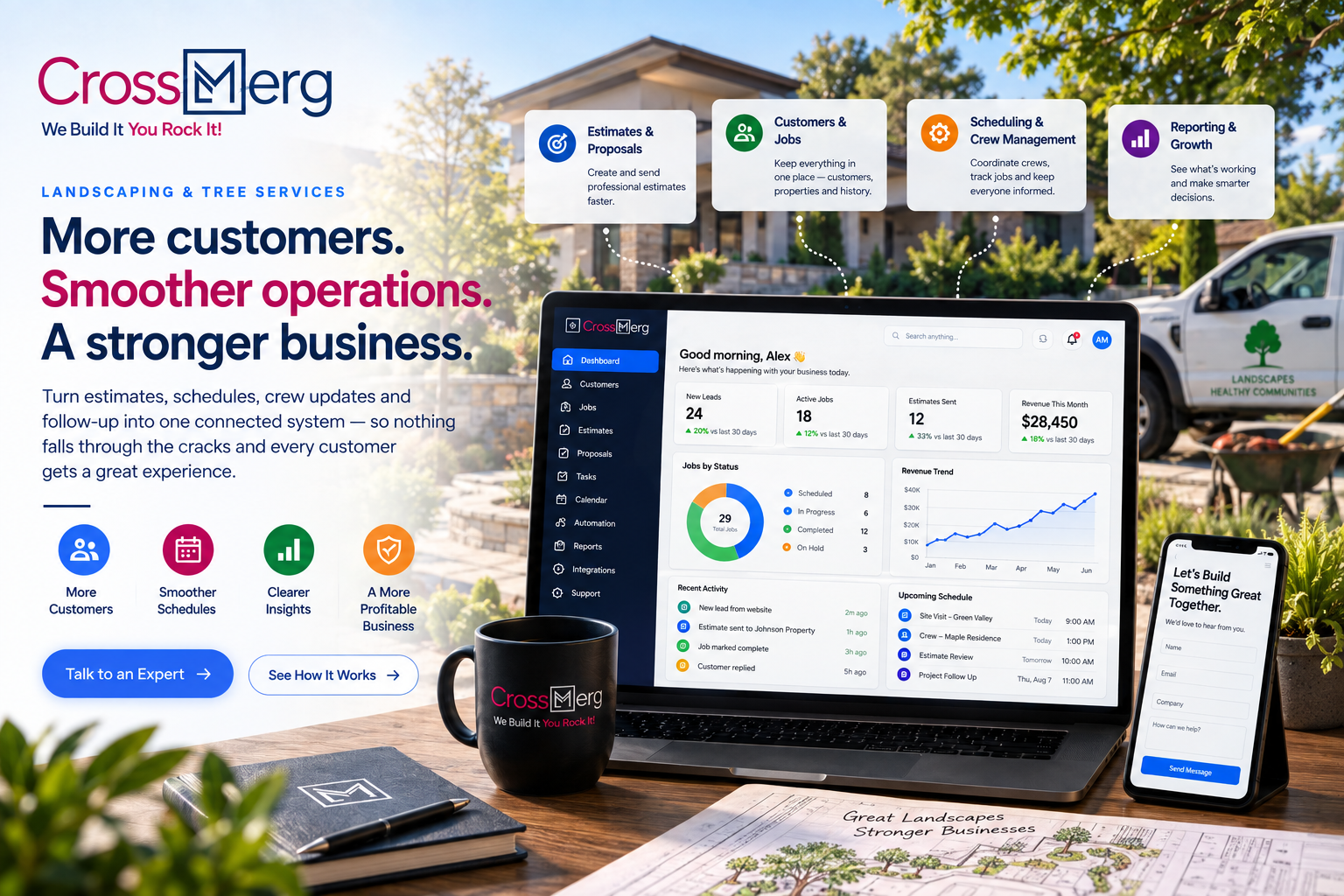
CrossMerg Landscaping and Tree Services workspace with CRM dashboard, estimates, scheduling, jobs, reporting, customer follow-up, and field-service business context

Where good work gets harder to manage

The problem usually is not effort. It is what happens between the handoffs.

Landscaping and tree service teams work across phones, properties, trucks, offices, job sites, estimates, schedules, customers, and weather. The system has to keep the relationship connected while the work keeps moving.

A good lead comes in while everyone is working

Calls, website inquiries, referrals, social messages, and repeat-customer requests arrive while the team is estimating, driving, or already on a job.

What that creates The first response and next follow-up can depend too much on memory.

The estimate becomes its own separate process

Site notes, photos, measurements, pricing, approvals, and follow-up often live in different places from the original customer conversation.

What that creates The customer record and the opportunity stop telling the same story.

Scheduling changes faster than the office can relay it

Weather, crew availability, equipment, emergencies, and job duration can change the day quickly.

What that creates Customers and staff spend time chasing the latest status.

The field knows things the CRM never sees

Crews notice access issues, added work, property conditions, photos, materials, or future opportunities that may never make it back into the customer record.

What that creates Useful job knowledge disappears after the crew leaves.

Completed work does not always create the next touchpoint

Review requests, seasonal reminders, maintenance opportunities, warranty follow-up, and future service needs are easy to postpone.

What that creates Repeat business depends more on remembering than on a dependable process.

The owner has activity but not enough visibility

Leads, estimates, booked work, lost opportunities, customer follow-up, and revenue indicators may require multiple systems or manual reports.

What that creates It becomes harder to see where work is getting stuck or what deserves attention.
Connected business-system capabilities

Put CRM at the center without pretending the CRM has to do everything.

The goal is one understandable customer and operating workflow, supported by the right tools around it.

First response

Lead intake & follow-up

Bring inquiries into a consistent CRM process with source, service need, ownership, status, notes, reminders, and clear next actions.

Sales workflow

Estimate pipeline

Track the movement from site visit to estimate sent, follow-up, approval, decline, or future opportunity without losing the customer history.

Operations

Scheduling context

Connect customer and job information to the scheduling process so the office can see what is planned and why it matters.

Customer experience

Customer communication

Use consistent reminders, status updates, appointment messages, estimate follow-up, and post-job communication where automation is useful.

Team handoff

Job & field handoffs

Keep notes, photos, conditions, customer requests, and next-step information connected across office and field workflows.

Management visibility

Reporting & business signals

See lead flow, estimate movement, follow-up aging, booked work, customer history, and other practical signals without building a reporting maze.

The operating principle

One connected process should be easier to understand than six disconnected tools.

CrossMerg focuses on relationship continuity, ownership, next actions, practical automation, and useful system connections—not adding software for its own sake.

The customer journey

A lead should not have to become a stranger every time the work changes hands.

A connected workflow keeps the customer, opportunity, job context, communication, and next action understandable from first inquiry through future service.

  1. 01

    Inquiry

    Capture who reached out, what they need, where they came from, and who owns the next response.

  2. 02

    Qualification

    Confirm service fit, location, urgency, scope, property details, and the right next step.

  3. 03

    Estimate

    Keep the site visit, notes, pricing, proposal, and follow-up connected to the same opportunity.

  4. 04

    Approval

    Record the decision, agreed scope, customer expectations, and handoff into scheduling or job preparation.

  5. 05

    Scheduled

    Give office and field teams the customer and job context needed to prepare and communicate clearly.

  6. 06

    Work

    Bring field notes, photos, changes, customer requests, and useful job information back into the relationship record.

  7. 07

    Follow-Up

    Close the loop with payment or completion steps, reviews, reminders, repeat service, and future opportunities.

The result: fewer invisible handoffs, clearer ownership, better customer context, and a much easier path for the next person to know what should happen.

Practical outcomes

Improve the parts of the business customers and staff actually feel.

The value is not another dashboard or another app. It is a more dependable day-to-day business process.

Faster, more consistent response

New inquiries have an owner, status, history, and visible next action instead of relying on whoever remembers first.

Clearer estimate follow-up

The team can see which estimates need attention, which customers responded, and where opportunities are aging.

Better office-to-field continuity

Customer history and job context stay connected as work moves between sales, office staff, crews, and management.

A more dependable customer experience

Customers receive clearer communication around next steps, scheduling, follow-up, and ongoing service opportunities.

More repeat-business opportunities

Completed work can feed reviews, seasonal reminders, maintenance plans, future estimates, and reactivation campaigns.

Better operating visibility

Owners and managers can see practical sales and customer signals without stitching together the picture by hand every time.

Your business already works today

The first question is not “What can we replace?”

The better question is which parts of your current process should stay, which should connect, and which are causing enough friction to improve first.

Keep what is already useful

A working estimating, accounting, scheduling, phone, payment, or field tool does not need to be replaced simply because CrossMerg becomes the CRM-centered system.

Connect where there is real value

When systems support integration, exports, APIs, webhooks, or dependable handoffs, CrossMerg can help reduce duplicate entry and disconnected customer information.

Use one clear source of relationship truth

The CRM should make it easier to understand the customer, opportunity, history, owner, next action, and important business context—even when other specialist tools remain in place.

Send your information

Start with the basics.

Four quick details are enough to get the conversation started.

1
Send your information

Share only the basics we need.

2
We review it

A real person reads the details.

3
You get a clear next step

Direct follow-up from CrossMerg.

Common questions

Make the system fit the business—not the other way around.

These are the questions that usually matter before a landscaping or tree service company changes how it manages leads, customers, estimates, and follow-up.

Decision guide

Four things to keep in view before changing the system.

Existing tools

Keep useful estimating, scheduling, accounting, or field tools when they still serve the business well.

Automation

Automate repeatable communication and handoffs where it reduces chasing without making the process harder to manage.

Team fit

Design the workflow around the people actually answering leads, preparing estimates, scheduling work, and serving customers.

Visibility

Track the few business signals that help the owner or manager know where attention is needed.

01 Do we have to replace our estimating or scheduling software?

No. We begin with the tools and process you already use. If an existing estimating, scheduling, accounting, phone, payment, or field system is doing its job, the better solution may be to keep it and improve how customer information and handoffs move around it.

02 Is this only for large landscaping companies?

No. The useful starting point is workflow complexity, not company size. A small owner-led company can benefit from clearer lead and follow-up discipline, while a larger operation may need more structured ownership, handoffs, permissions, reporting, and automation.

03 Can CrossMerg help with both landscaping and tree service workflows?

Yes. The shared customer journey is similar, while the details can differ around estimating, site conditions, crews, equipment, urgency, safety, recurring maintenance, and scheduling. The system should reflect the way your business actually works.

04 Can you automate estimate follow-up and customer reminders?

Yes, where automation supports the customer experience and the team can still understand what is happening. Follow-up can be based on stages, timing, status, service type, or other controlled business rules instead of sending generic messages blindly.

05 Can the CRM track repeat or seasonal service opportunities?

Yes. Customer history, property context, prior work, service categories, dates, reminders, and campaign eligibility can be used to support seasonal outreach, maintenance reminders, reactivation, and other appropriate repeat-business workflows.

06 What if our current process is mostly spreadsheets, texts, and notes?

That is a valid starting point. We can map what each tool is currently doing, identify the information that should become structured, and move the highest-value parts into a more dependable workflow without trying to rebuild everything at once.

07 Do you provide the CRM and also help manage it after launch?

Yes. CrossMerg is positioned as a managed business systems partner with CRM at the center. Depending on the scope, that can include implementation, configuration, workflow automation, integrations, reporting, training, support, and ongoing CRM management.

08 What happens after I submit the form on this page?

Your information enters the CrossMerg Landscaping & Tree Services marketing workflow. We use what you provide to understand your current process and follow up with relevant information and a practical next step. You can unsubscribe from marketing communication through the normal unsubscribe controls.

Start with continuity: the best business system is not the one with the most features. It is the one that helps your team know who the customer is, what is happening, who owns the next step, and what should happen next.

A practical first conversation

Start with the workflow you already have—not a generic software checklist.

We can look at how a new inquiry becomes an estimate, how approved work reaches the schedule and field team, what customers hear along the way, and where useful information or follow-up tends to disappear.

No forced software replacement No need to rebuild every process at once No obligation to buy before the workflow makes sense

What we can review together

01

Review how leads, estimates, scheduling, customer communication, and completed jobs are handled today.

02

Identify the handoffs, duplicate entry, missing information, and follow-up gaps creating the most friction.

03

Choose a practical first improvement and decide what should stay, connect, automate, or move into the CRM.

When you are ready, start with the workflow that is creating the most chasing, lost follow-up, or disconnected customer information today.

Landscaping & Tree Services

Build a customer and operations workflow your team can actually keep using.

Bring us the process you have today. We will help identify where CRM, automation, integrations, and clearer ownership can reduce friction without turning your business into a software project.

Why businesses trust CrossMerg

Practical systems. Clear ownership. Human support.

We help teams improve the client experience without adding unnecessary complexity, forcing a large migration, or losing sight of how the business actually works.

Practical value

Why teams choose CrossMerg

  • Fewer status calls because clients can see what’s happening.
  • Faster approvals because the next step is obvious.
  • Cleaner payments because invoices have context and history.
  • A more professional client experience without enterprise complexity.

Founder perspective

A note from the founder of CrossMerg

If you tell us what your clients struggle with today — approvals, payments, scheduling, status updates, or disconnected processes — we’ll recommend the smallest practical step that can make a meaningful difference.

We focus on improvements teams can actually adopt, not abstract features that look impressive in a demo but create more complexity in day-to-day operations.

Our starting point Find the smallest practical improvement that creates meaningful value.

How we work

How we build better client experiences

Client-first language

We translate internal workflow into simple client-facing steps that reduce friction.

Lightweight rollout

Start with one feature before rolling out deeper portal options.

Works with your reality

We respect your team size, tools, and capacity — no forced big-bang migrations.

Start small and expand later. No long-term contracts or surprise fees. Built and supported by a small, US-based team.